728x90
반응형
빌드 파일을 뽑았을 때, GameplayCue Tag가 제대로 지정이 안돼서 Cue 실행이 안되는 경우가 있다.
만약, 에디터에서도 그냥 안나온다면, 혹시 GameplayCue를 C++로 구현했고, 생성자에서 직접 Cue Tag를 지정하고 있지는 않은지 확인하자.
C++의 생성자에서 태그를 지정하고 Cue를 블루프린트로 만들어 사용한다면, 태그가 제대로 지정이 안될 가능성이 있다.
블루프린트에서 Cue Tag를 재할당 해보자.
먼저 Cue Tag를 추가했으면, "Config" 폴더에 "DefaultGameplayTags.ini" 파일이 있을 것이다.
여기에 제대로 "Cue Tag"가 추가되었는지 확인한다.
// DefaultGameplayTags.ini

+GameplayTagList=(Tag="GameplayCue.Player.Blink.End",DevComment="")
+GameplayTagList=(Tag="GameplayCue.Player.Blink.Start",DevComment="")
다음으로, "Config" 폴더에 "DefaultEngine.ini" 파일에 사용하는 GameplayCue들이 들어있는 경로를 추가한다.
// DefaultEngine.ini

[/Script/GameplayAbilities.AbilitySystemGlobals]
+GameplayCueNotifyPaths="/Game/Blueprints/GAS/GC"
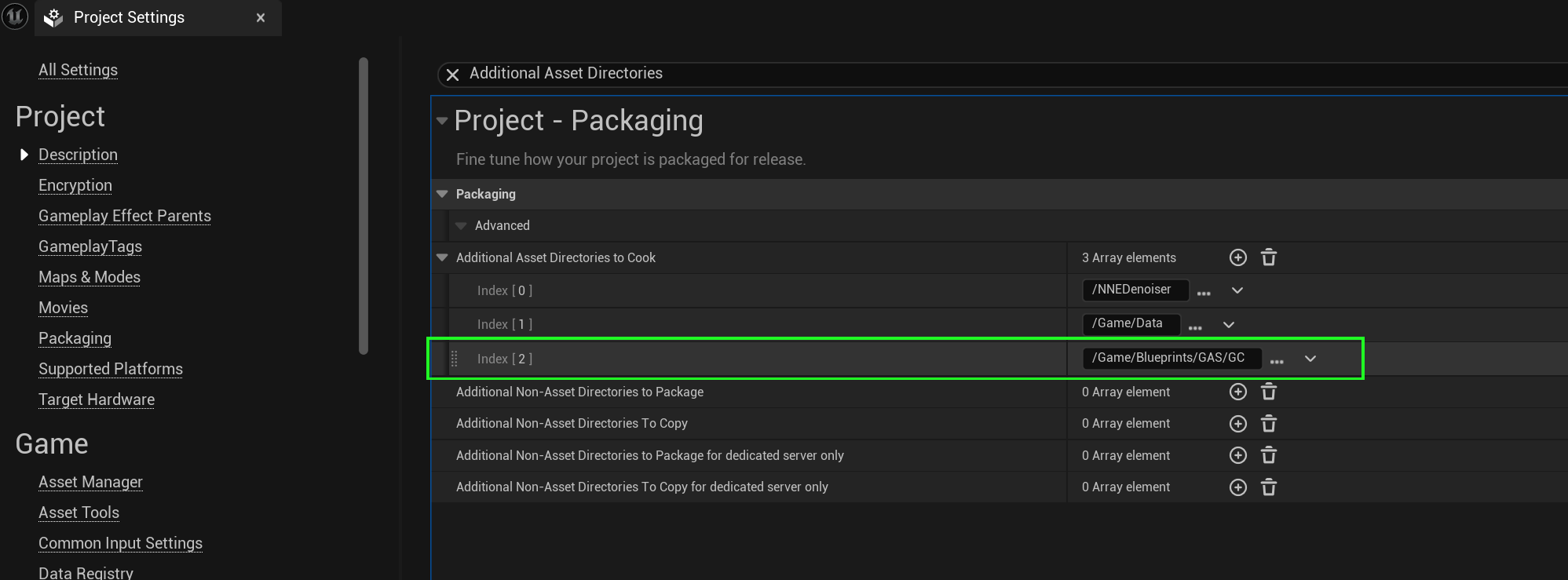
다음으로, " Project Settings → Packaging"의 "Additional Asset Directories to Cook"에 사용하는 GameplayCue들이 들어있는 경로를 추가한다.
728x90
반응형
'📘Unreal Engine > 📝Gameplay Ability System' 카테고리의 다른 글
| [GAS] 게임플레이 어빌리티 Delay 사용하기 (0) | 2025.10.15 |
|---|---|
| [GAS] ASC에서 특정 태그와 매칭되는 활성화 가능한 어빌리티 가져오기 (0) | 2025.04.22 |
| [GAS] ASC에 수동으로 태그 추가 / 제거하기 (0) | 2025.03.31 |
| [GAS] GameplayCueNotify_Actor vs GameplayCueNotify_Static (0) | 2025.03.19 |
| [GAS] 특정 태그 부여 시, 콜백 함수 바인딩 (0) | 2025.03.06 |